Your offer, one scan away. You keep it up to date.
Manage your menus, price lists and QR codes in QuickQR. Give people a way to find your offer, visit a page you already have or join your WiFi network. Update prices and translations yourself, and publish when you are ready.


A sample menu built in QuickQRSolnica
The card scans straight off the screenOpen the menu ↗
- Trial
- 14 days of Pro, no card
- For guests and customers
- Opens in the browser, no app and no cookies
Your offer, information and staff calls.
A code can open your offer, lead to information you already publish, or let a guest at the table call your staff. Start with what you need today and add the rest when it helps.
Offer and prices
A food menu, a drinks list or a price list for your services, with descriptions, photos and translations. When something changes, edit it and publish.

Information and access
A code can lead to a page, document or catalogue you already have. A separate WiFi code joins a phone to your network, with no password to type.
Any linkevery plan
Review and Instagram shortcutsPro
WiFi networkPro
Staff callsPro
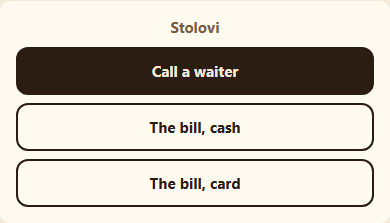
A guest who scans the code on their table can call your staff or ask for the bill from the menu. The request reaches your staff in QuickQR, and the guest sees when it has been picked up.
Orders and paymentin development
By business For cafés For restaurants For hotels
Cards and stickers ready to print.
Put the code where people look for it: on the table, the counter, the door or in the room. Basic and Pro include ready-made templates with your logo and QR code.
Every format at the same scaleTemplates from the app, carrying the real example code
Three plans. Start free.
Every new account gets 14 days of Pro, no card. After that: stay on Free, or pick the plan that fits.
Free0,00 €
for as long as you like
For one short offer and a few codes, with no monthly subscription.
- 1 menu
- 40 items
- 1 language
- 3 QR codes (PNG)
- Small QuickQR badge on the menu
Basic12,00 €/ mo
or 99,00 € per year
For your full offer, with translation, Excel import and print templates.
- 1 menu
- Unlimited items
- 2 languages with automatic translation
- Unlimited QR codes, SVG and print sheets
- No QuickQR badge
Pro19,00 €/ mo
or 159,00 € per year · Most complete
For several menus and price lists, WiFi and other codes, staff calls and your whole team.
- Unlimited menus
- Unlimited items
- 4 languages with automatic translation
- Unlimited QR codes, SVG and print sheets
- No QuickQR badge
Initial setup149,00 €
one time, on top of any plan
Send us your current menu or price list, photos and logo. We enter it, set up the design and prepare your QR codes for print. After that, you keep it up to date yourself.
Frequently asked questions
If your question is not here, get in touch: Contact
Is QuickQR only for restaurants and cafés?
No. Build a service price list or product range with categories, descriptions, prices and translations. You can start with a blank price list and your own items. If the information already lives on a website, in a document or catalogue, start with a link. That code does not require a menu.
Do guests and customers need an app?
No. They scan the code with their phone camera and the page opens in the browser. No account, no app, and your QuickQR page sets no cookies.
Do I have to reprint the codes when something changes?
No. A code goes through QuickQR, so a new price, description or link destination only needs publishing or saving. WiFi codes are the exception: they carry the network name and password, so reprint them when either changes.
Can my offer be in more than one language?
Yes. Basic and Pro include automatic translation that you review and edit before publishing. People choose their own language. The plan comparison shows how many languages each plan includes.
Can I take orders and payments through QuickQR?
Not yet. Orders and payment are in development. Today, with Pro, a guest at the table can call your staff or ask for the bill, and pays the way they always have.
What happens if I stop paying?
You move to Free. Your offer stays published, the QR codes keep working and you can still edit within the Free limits. Anything over them is frozen, not deleted.
Set up your offer and first code today.